
A prospective student sees your Instagram reel about JLPT N3 grammar, or a friend forwards your name in a LINE group. They tap the link in your bio. Where do they land? For most independent tutors the answer is a booking calendar with no context, a social feed, or nothing at all. The person was interested for about thirty seconds, and nothing on that page proved you could teach them.
A tutor profile page fixes that. It is one public page that says who you teach, shows one piece of real teaching, and gives one clear next step. Quizzz now builds that page for you, and lets you put a short placement quiz right above the booking button.
👉 Open Quizzz · See an example profile · Start free
What a tutor profile page actually needs
Strip away the design advice and a profile page has three jobs:
- Say who you teach and for what. Not "Japanese lessons" but "Japanese for working adults in Taiwan preparing for JLPT N3 and N2." A visitor should know within one sentence whether this page is for them.
- Show one proof of teaching. A certificate is a claim. A ten-question quiz the visitor can take right now is evidence. It shows your level, your material, and how you explain a wrong answer.
- Offer one clear next step. Book a trial lesson. Join the class group. Message you. One button, not five competing ones.
Everything below is about getting those three things onto a single address you can paste anywhere.
Build it in Quizzz, step by step
- Open Quizzz and go to Profile.
- Set a URL slug first. This becomes the
/t/<slug>part of your address. Publishing is blocked until you do, so pick something short you will not want to change: your name, your school, or your brand. - Upload an avatar and a banner, choose a page background, and write a short bio. Use the one-sentence rule above.
- Add link buttons. Each can point anywhere: a public quiz, a Collection of quizzes, your class link, your socials, or your booking page.
- Click Publish. Edits you make later stay private until you publish again, so you can revise without showing a half-finished page.
Your page is now live at quizzz.techtranslab.com/t/<slug> and at the short address quizzz.link/t/<slug>. Both are Quizzz's own domains and serve the same page. The short one reads cleaner in a bio or on a printed flyer. Every exam link in Quizzz also has a QR code page (add /qr to the link), so a quiz on your profile can go on a classroom poster or a café noticeboard too. Full steps are in the profile page guide.
The "try before you book" pattern
This is the part I would not skip. Put a short placement quiz directly above your booking button, either as a profile link or embedded on your own website.
Here is what the visitor experiences. They open the quiz with no account and no sign-up. They answer eight or ten vocabulary or grammar questions. They see their score and, more importantly, the specific items they got wrong. That moment, when someone sees "you missed 3 of the 4 questions on て-form," is when "maybe I should take lessons" becomes "I should book with this teacher." The booking button is right there, so they do not have to go looking for it.
On your own site, the booking embed pattern works with any scheduling tool you already use: Calendly, Acuity, TidyCal, a Google Calendar booking page, or a plain contact form. There is nothing to integrate. You paste the quiz embed code, then your booking widget below it. Getting the embed code takes three clicks: Assignments → Generate Links → Generate Embed Code, pick a mode, copy. Classic mode (whole quiz on one page) works on every plan; Guided and Interactive are on Lite and Go. Details are in the embed guide and on the widget embed page.
If you do not have a website, the same thing works on the profile page itself: one button labelled "Take the 5-minute level check" pointing at a public quiz, and the next button labelled "Book a trial lesson."
One page for everything
Tutors tend to accumulate links: the class group, a Google Drive folder, an Instagram, a YouTube channel, three practice quizzes. Sending students five different links means each one gets lost on its own. A profile page turns that into one link you give out once.
Group your practice quizzes into a Collection and link the whole Collection from one button, so "this month's N3 practice" is a single tap. Add your class link and your socials as further buttons. New students only ever need to remember quizzz.link/t/yourname. The link-in-bio page explains how this compares with generic bio-link tools, which cannot host a quiz that grades itself.
Make it yours
Under Profile you can set a brand colour and accent. It flows through your public profile, your exam pages, and your share cards, so a student who opens a quiz from your page sees your colours, not a generic tool.
On the Pro plan you can serve the profile from a custom domain, so it lives at your own domain's root with no /t/ in the address, and your logo, favicon, and SEO title and description take full effect. Your profile and every exam page then look like your school. See the custom domain guide and the branded quiz page overview. On other plans the /t/<slug> address is always available.
One thing to be clear about: Quizzz is not a tutoring marketplace. We do not refer students to you or take a commission for matching. The students who book through your page are your students, on your curriculum, under your brand. If you turn on paid booking, a platform booking fee applies, depending on how you collect payment (Stripe Connect or Quizzz collection) and your plan. See pricing for details.
Edit your tutor info card
On the Tutoring info tab of your Profile Page in the admin, add your subjects, audience, teaching mode and a reference price. After you publish, it shows at the top of your page and on your card in the teacher directory.
Publish to the teacher directory
Once your page is published, tick "List me in the public teacher directory" under Visibility & contact, and students without your link can find you in the teacher directory. You can opt out any time. Your directory card leads to your public profile page at /t/<slug>, so build that first.
See a sample profile page
This sample profile is a template you can copy: a trial-booking button at the top, then class links, free practice quizzes, social links and pricing by level. Open it on your phone to see what a student sees after tapping your bio link.
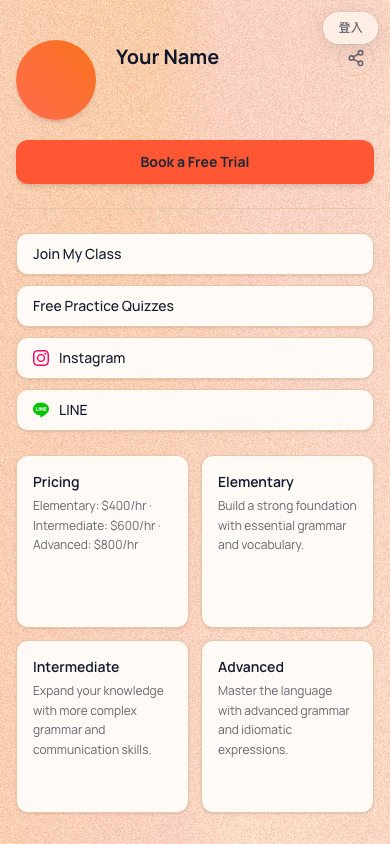
For a profile in real use, see the author's own page, which pairs a podcast with free practice quizzes.
A ten-minute checklist
- Slug set, avatar and banner uploaded.
- Bio states the language, the audience, and the exam or level in one sentence.
- One short public quiz linked or embedded as the level check.
- Booking button directly after the quiz.
- Remaining links grouped: one Collection, one class link, socials.
- Tutor info card filled in.
- Brand colour set. Published, then opened on your phone to check.
- To be found by new students, list yourself in the teacher directory.
Build it this afternoon, put the quizzz.link/t/ address in every bio you have, and the next person who taps it lands on proof instead of a calendar.
👉 Open Quizzz · Tutor profile page · Browse the teacher directory · Start free
Related posts
How to Write a Listening Scenario That Generates Better Listening Questions
"A conversation at a station" gives you a generic dialogue. Name the place, the speakers, the purpose, the one fact students must catch and a detail that changes, and the question tests what you taught. Examples for Japanese, Chinese and English, matched to each listening format.
Picture and Audio Answer Options: Multiple-Choice Questions Beyond Text
Each answer option in Quizzz can now carry a picture, an audio clip, or both. Five question ideas for language classes, how to add media in the quiz builder, what students see, and what to know before you assign it.
How to Make a Vocabulary Quiz That Tests More Than Recognition
If every question is "choose the meaning", students pass by recognizing words they cannot use yet. How to mix question types in a vocabulary quiz, turn your word list into one with Quizzz, and keep students reviewing with flashcards and word games.